WeatherDefinition
WeatherDefinition is a ScriptableObject used to create and configure custom weathers for Lethal Company. It provides a Unity Editor interface for defining weather properties, spawn conditions, and gameplay modifiers.
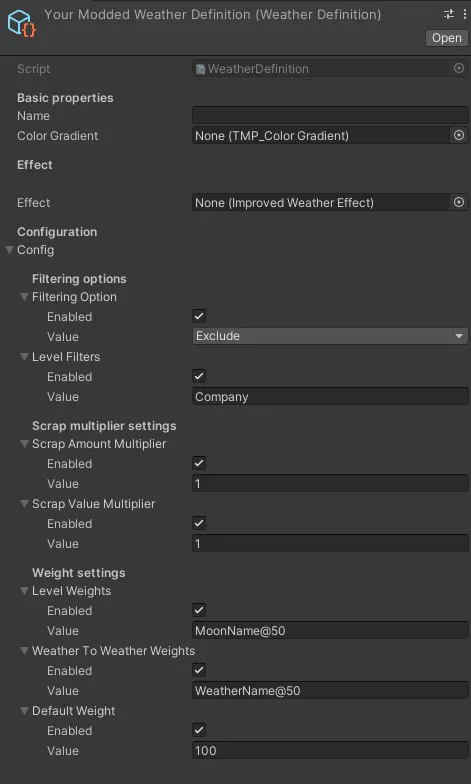
WeatherDefinition serves as the primary tool for creating custom weathers in the Unity Editor. It combines visual configuration, spawn weights, and gameplay modifiers into a single, easy-to-use asset.
Creating a WeatherDefinition
Section titled “Creating a WeatherDefinition”In Unity Editor
Section titled “In Unity Editor”- Right-click in the Project window
- Select
Create > WeatherRegistry > WeatherDefinition - Configure the properties in the Inspector
- Assign the definition to an AssetBundle for runtime loading
Properties
Section titled “Properties”Basic Settings
Section titled “Basic Settings”The weather’s display name shown in-game on the terminal and ship monitor.
ColorGradient
Section titled “ColorGradient”A TextMeshPro ColorGradient that defines the colors displayed on the ship’s terminal screen when this weather is active.
Effect
Section titled “Effect”The ImprovedWeatherEffect component that defines the weather’s in-game behavior and visual effects.
Configuration Options
Section titled “Configuration Options”Each configuration option includes an Enabled checkbox to allow player customization through config files.
Level Filter Mode
Section titled “Level Filter Mode”Values:
Include- Weather only appears on listed moonsExclude- Weather appears on all moons except listed ones
Level Filters
Section titled “Level Filters”Semicolon-separated list of moon names where this weather should or shouldn’t appear.
Example:
Scrap Amount Multiplier
Section titled “Scrap Amount Multiplier”Multiplier for the amount of scrap spawned on moons with this weather. Default is 1.0 (vanilla behavior).
Example values:
0.5- Half the normal scrap count1.0- Normal scrap count1.5- 50% more scrap
Scrap Value Multiplier
Section titled “Scrap Value Multiplier”Multiplier for the value of spawned scrap on moons with this weather. Default is 1.0 (vanilla behavior).
Example values:
0.75- 25% less valuable scrap1.0- Normal scrap value1.25- 25% more valuable scrap
Level Weights
Section titled “Level Weights”Semicolon-separated list of moon-specific spawn weights in the format MoonName@Weight.
Example:
Higher weights increase the likelihood of the weather appearing on that moon.
Weather To Weather Weights
Section titled “Weather To Weather Weights”Semicolon-separated list of weather transition weights in the format WeatherName@Weight.
Example:
Controls the probability of transitioning from this weather to other weathers. Higher weights make transitions more likely.
Default Weight
Section titled “Default Weight”Fallback spawn weight used when no specific level or weather-to-weather weight is defined.
Default value: 0 (weather won’t spawn unless specific weights are set)
Usage Examples
Section titled “Usage Examples”Basic Custom Weather
Section titled “Basic Custom Weather”Moon-Specific Weather
Section titled “Moon-Specific Weather”Weather with Transitions
Section titled “Weather with Transitions”Best Practices
Section titled “Best Practices”-
Weight Distribution: Keep total weights reasonable (0-100 range) for predictable spawning:
-
Scrap Multipliers: Use multipliers to balance risk vs. reward:
-
Filter Modes: Use
Excludefor weathers that work everywhere except specific moons: -
Config Options: Enable configuration for gameplay-affecting properties: